Handy Ableton Tip – Change a Macro Name After It’s Been Mapped.

Problem:
You may have noticed that after you map a macro knob to another macro, you can then no longer rename it either by clicking on it and pressing [CMD-R (mac) / CTRL-R (windows)] or by right-clicking it and selecting “rename” — the context menu option disappears for that macro =(
Image
Solution?
As long as you have at least one unmapped macro in the rack, click on an unmapped macro. Then press “Tab” until the macro whose name you want to change is highlighted.
You are free to rename it as you like now…sweet!
If the macro it is nested to is currently unnamed, its name will reflect the new change as well.

Image

I went a long time working in Ableton before realizing you can do this, so maybe it slipped under some other radars as well, so i figured i’d pass it along as a quick tip. If you make your own Racks all the time like me being able to rename a macro after it has been mapped if desired is quite useful.

That’s all for today… more heady packs in development.

Peace!
Updated set of free special racks to economize cpu: “The Enablerz”

“The Enablerz”

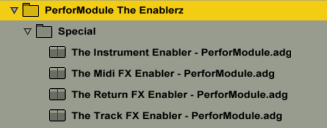
The Enablerz browser image
What they are:  An Ableton Live rack (one each for effects in audio tracks, effects in return tracks, midi effects, and midi instruments)  used to temporarily disable devices without deleting them, thereby freeing up some ever-precious CPU.

Features:  Frees up CPU of contained racks. Click-free realtime operation (feel free to enable/disable while audio is routing through). Input Trim & Output Gains.The Enablerz - Track

Continue reading

Free Device- the Subaqueous Kick Selector

Need kicks? Here we have for you this free Kick Selector courtesy of http://www.subaqueousmusic.com/  ~ the (aqpm) Kick Selector, chock-full of sweet kick samples.
Subaqueous sent me the rack and i tweaked it to be able to harmonically match whatever key your song is in.
It’s always nice having more kick drums to choose from, as the kick drum is a very important component of almost any song.
This rack includes a tasty selection of kick samples, all set to the same pitches and volume levels for easy swappability (is that a word?).

This rack works well playing as just an isolated kick drum when you need one for your song, or you can replace the kick on the drum rack you are working on with this (just drop it over that slot to replace), if you’d like to change it up.

Download it for FREE immediately by CLICKING HERE.

subaqueous kick selector image

Macros_

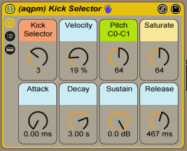
“Kick Selector” – select your kick from amongst 9 choices
“Velocity” amount kick’s volume is affected by input strength
(set this to zero if you want your kicks always at full volume.. higher if you want input pressure to affect volume)
“Pitch” – sets the root note of the kick sample from C0 to C1. At default of 64 it happens to be a G#/Ab. Set it to an important fundamental pitch of your song’s key for harmonic swagger.  You could even modulate it to switch to a different root note for different song sections.
“Saturate” – sets the amount of saturation and limiting. If the kick sounds weak in the mix to you, turn this up. If it sounds too distorted, turn it down.
“Attack, Decay, Sustain & Release” – your standard ASDR controls. If you’re yet not familiar with what the heck “ADSR” envelopes are, check out http://audio.tutsplus.com/tutorials/production/an-introduction-to-adsr/

~`~

Handy Ableton Tip – Macro Default Positions

You already know that you can hit the “delete” key on any parameter in a device to return it to its default position (or, in Live 10, double-click it).

But did you know that if you save a preset as a rack and then tweak a macro (after re-opening the version you saved), you can hit “delete” to return to whatever YOU set as the default position for it?

When you hit “Delete” on a macro of a plugin (Ableton Core or VST/AU), it returns to that plugin’s default position, which cannot be changed (set per plugin device).

So like if you drop Ableton’s “Chorus” effect on a track and mess with parameters and hit “Delete” on them, they will return to the Chorus Device’s default positions for those parameters. But sometimes you may not like having those pre-chosen values as the defaults to snap back to. The solution is to use Racks!

For saved rack presets in your library, the “Delete” key on one of the 8 macro knobs will return the value of a given macro knob to the position it was set at when it was saved (the “default position”).

[Note this does NOT work with the chain selector or chain volumes. Hitting “Delete” on the chain selector returns it to 0 and hitting “Delete” on any chain volumes returns them to 0db.]

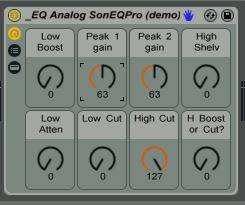
So let’s say i make a preset for a VST EQ Audio Effect and set the “Mids” to +0 Gain as default at the exact half range (63.5). Then if i tweak the mids macro up or down and want to return to 0, instead of typing “63.5” in the macro or try to line it up with the mouse, just hit “Delete”! Way easier.
~`~

1) Saved Preset
Default Macro Positions 1

2) Tweaked Macro

Default Macro Positions 2

.

.

.

3)”Delete” key snaps it back to default!

Default Macro Positions 3

.
.

.

.

(the display rounds to nearest whole #… in this case 63.5 reads as 63)

`~`

New free audio effect rack: “Eroduxion”

Eroduxion imageEroduxion

PerforModuleEroduxion:
Combines the total capabilities of the Redux and Erosion effects in one device (set in parallel), with the ability to fade between them.

Next time you feel like using some Erosion and/or Redux on a track, try this effect rack instead and save yourself a sec.

Stereo Panning Trick:
~Use the Pan Controls in the rack chains to separate the erosion and redux channels, one to the left and one to the right (the same value). Then use the performodule ‘Low Centerer’ effect rack immediately after ‘Eroduxion’ in order to prevent your low-frequency content such as kick drums from getting panned outwards.

Get yourself Eroduxificated for free by clicking THIS HERE LINK.

Listen to a demo of the Eroduxion rack in action:

`=]~

Limitization – 3 free Limiter Devices for Ableton Live 9

Francis Preve ( http://www.francispreve.com/ ) posted something which inspired me to make Glue Compressor- and Saturator- based limiter device presets using their clipper functions. I went ahead and made them as one-knob fx as there weren’t too many parameters to deal with. I also decided to make a device similar to the performodule “hybrid” compressors which can be used to compare between the 3 limiter possibilities (calibrated with matching settings) in one device rack, which is a real time-saver. That one also has control over fine-tuning parameters for fully robust usage.

How to use: place one of these devices as the final device on a master track for a final master. Turn up the “push” knob to the desired setting (maximum is +9db). Try to boost it while avoiding any unpleasant distortion. The final output will not exceed 0db.
I would describe the GluLimiter as rich, the SatuLimiter as meaty, and Ableton’s Limiter as straightforward.
For the Try Limiter: Set the push knob as above. Try the 3 limiter choices and decide which one fits the piece most appropriately. Try different settings for attack and release (including auto-release if desired), and you can set the final output from -.5 to -.2 db. One workflow method is to turn push all the way up so the effect is extreme, set attack and release where they feel the most natural and dynamic, and then turn push back down to the ideal value. Then choose the limiter type that has the favorite character at those settings.
(turning the “chooz” knob during playback can cause an unwanted temporary peak. If that happens hit “shift-spacebar” twice to reset your peak meters)

Get the single-knob GluLimiter:
CLICK HERE

Get the single-knob SatuLimiter:
CLICK HERE

Get the triple-auditioning Try Limiter:
CLICK HERE

Performodule Fx

~`~


PerforModule – uno Freqification Series – six free Ableton Live 9 single-knob effects

Did you know that Ableton’s “Frequency Shifter” effect can be used to simulate a few different types of effects such as phaser, flanger and tremolo?

Here are 6 different effect racks each set to something different that can be achieved with the frequency shifter device, each handily set to have just a single macro control. Continue reading

Magical Gate: an input-receptive Gate device for Ableton 9 + Max For Live

Magical Gate

— A gate with soul.

Magical Gate

“Magical Gate” is a gate effect with a magical touch — it moves according to the input signal. It doesn’t cut off sounds as linearly as a normal gate.

It’s organic. Kinda like it’s alive or something. It is more reactive and sensitive to the host material. It’s less cold and digital and robotic and linear than most gates.
…You could say it has a soul. Continue reading

PerforModule – uno Glitchification series: 9 free Ableton Live 9 single-knob glitch effects

 New PerforModule one-knobbies! GLi+tChH c-C-r>.’|)razZy_y !

These are relatively simple rhythmically-based one-knob effects, designed primarily for live performance, each based on a built-in ableton effect or two.
Individually, they are very simple and easy to understand. They are optimized to be grouped into your own more complex multi-effects to map to midi controllers, with each knob having one specific function. Continue reading