Actually Using Push 3’s “User Mode”
The free Push 3 User Mode template has been updated for Live Suite 12.4.1+ and is available once more!
(Grab the .alp directly here).

The free Push 3 User Mode template has been updated for Live Suite 12.4.1+ and is available once more!
(Grab the .alp directly here).
Just about every Ableton Push owner I’m acquainted with: “Yeah, I know the Push has a mode for custom MIDI mapping… but I don’t really use it for anything.”
I have at times gone to inordinate lengths to map controllers so they have as many different useful functions as possible. So upon finally acquiring a Push for myself, I was eager to brainstorm how best to integrate its User Mode into the grand scheme. Well, it took awhile, but I got something!
[Screw all this reading…skip down low to the free download.]
Continue reading
Inspired by the on-the-spot pieces crafted by participants of today’s Music Production Club meeting (I was late and didn’t make a piece, but listened to the others and they were awesome), I spontaneously decided to share an upgraded version of the Tuned Sub Kicker from the free Sweetie Pies pack which has been lurking in my library, unreleased publicly, for quite some time — until now — at 8:08:08pm on 8/08 (my time).
Well, here you go!
>>>Download Tuned 808 Kicker for Live 10+<<<
It’s like the Tuned Sub Kicker, but more growly!
Dial it in to add incisive, tuned sub thump to any drum loop. It’s sick! And dope!
It has Bzork knob. What else is there to say?
Enjoy! 😊
When applying dynamic effects, we are rarely going to need the entire timing ranges available, depending on the tempo, right? The new Tempo Dynamics pack provides go-to racks with minimum and maximum values hard-wired to ranges most potentially useful, given the chosen tempo — avoiding values that are likely too fast or too slow to be helpful.
Continue reading Since my son has now acquired Ableton Live 11 Intro, I thought it would be interesting to make a pack of effects that utilize only effects native to that iteration of the software. These include Audio Effect Rack, Auto Filter, Auto Pan, Beat Repeat, Channel EQ, Chorus-Ensemble, Compressor, Delay, EQ Three, Erosion, Gate, Grain Delay, LFO, Limiter, Looper, Phaser-Flanger, Redux, Reverb, Saturator, Tuner, and Utility. This is no paltry collection to smirk at! Quite a range of possibilities. But also — a nice change of pace, being arbitrarily limited in options according to what I am used to as a rack craftor. I saw it as an exciting challenge. At the end, I’m super proud of what I’ve come up with. Methinks I’ll definitely be using these racks in the full version of Live 11 Suite aplenty moving forwards.
~`~

(or acquire via Gumroad if you prefer).
Read about the process of the device creation below.
It’s a set of free presets for Dither, optimized for the Metal genre.
They were made for the mastering of the upcoming metal album, Lust & Insecurity by Animus Invidious.
Noise-shaping dither algorithms are theoretically optimized to “bury” the noise in the frequencies you hear least, while avoiding so much in the preeminent tonalities (in this case, distorted electric guitars focused around 2.5kHz).

You can DOWNLOAD HERE and open the .fxp presets using your DAW of choice. If you happen to use Ableton Live 11, you can additionally access the .adg Racks which allow for more easy snapping-to or fine-tuning of the intensity value.
⚠️ You are also going to need to grab the free TB_Dither_v3 VST2 plugin if you don’t have it already, which has been graciously set free amongst a slew of other awesome legacy TB plugins.
Continue reading So one day i got it in my head to figure out which of Ableton Live’s Effects are the best to use in parallel.
What is the criteria for this? Simply, which processes alter the phase of audio passing through them, either to the least degree, or in a nicely summable way.
Why does this matter? Because phase offsets, when summed in parallel with the original signal, will inevitably cause changes to the frequency contour. Sometimes slight amounts of this phase offset can add a nice creamy touch to the sound of things (and pretty much all analog gear causes it to some degree), but when being surgically technical like during the finalizing stages of a track, they are generally just not helpful.
An example of not altering phase at all is Live’s Compressor effect which is phase-neutral; it can be used safely in parallel with no unwanted frequency coloration whatsoever.
An example of altering the phase in a “nicely summable” way is Live’s Reverb. Technically, it’s altering the phase a whole bunch, but it’s doing so in a time-smeared fashion which results in far less likelihood of perfectly-lined-up frequency cancellations, and so, when at 100% wet, reverbs can be just fine to use in parallel, and are often preferred this way.
After carefully checking the phase response of all of Ableton Live Ten’s native Audio Effects, i came up with five distinct racks providing combinations of the most parallel-friendly native effects, optimized for specific purposes with maximal versatility of application.
~`~

>Download ParallAux PDF Manual<

Here’s a bunch of Reverb IRs for you, sampled from the unobtainable TC M30 Plugin.
I believe that plugin was one of the very first VSTs i ever grabbed after i started getting into Ableton Live. I remember it being some sort of time-limited temporary free offer. After years of not thinking about it, i recently realized i still had a working 32-bit copy of the plugin, and so took some IR snapshots of it, because why not.
We’ve got a new pack for you, Super Awesome Sounds, featuring samples of the Casio SA-20 Keyboard. This was my first instrument as a kid and thus has a very nostalgic place in my heart, so i recently re-acquired one and went nuts sampling its 100 patches and making instrument and drum racks for ableton live out of them (plus audio effect racks inspired by them), using the amalgamation of my accumulated knowledge over the years to create the most refined PerforModule instrument pack to date.
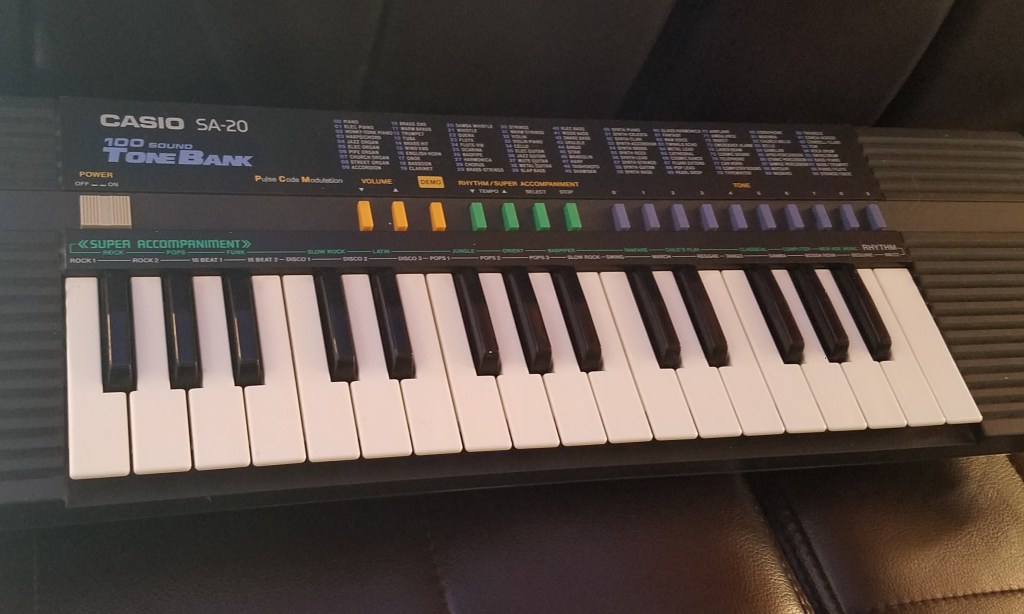
Since it seemed to fit nicely with his existing collection which includes quite a lot of 80s- and 90s-esque sensibilities, i’ve teamed up with Brian Funk to release the pack. We talked about it as well as various other random topics on his show, the Music Production Podcast. Many thanks to Mr. Funk for having me on, always an interesting and insightful time.
There is a free version of the pack as well as the full version linked below, which can be currently had for just $6 by joining Brian’s Music Production Club this month (along with a bunch of other cool stuff). That’s a sweet deal! The MPC is a great way to acquire a constant influx of goodies into your inbox every month for a very accessible sum, so that even poor, cheap bastards like me can afford it. It’s rad! The price for Super Awesome Sounds is otherwise $15, itself a tubular deal considering the vast assortment of wonderful gadgetry it contains within.
Click to check it out at Brian Funk’s site.


***Note: “Sweetie Pies” has been updated for Live 11 Suite! Grab the Live 11 version here.

(For the original Live 10 version, continue below.)
While we’re going through some crazy times, it has been heartwarming to experience how humans have upped their compassion game in response to shared crisis. I’ve seen more freebies and crazy deals going on this past week than any other time i remember, which seems because people want to help each other, share and be nice (well, not so much a certain political faction in the usa who seems to prefer that regular people suffer as much as possible. But that’s another topic). With graciousness and care for their fellows is how humans should act, rather than trying to take advantage of each other sleazily—which happens all too much.
In this spirit, i am offering up my super secret stash of “Sweetie Pies”—a small collection of effect racks for Ableton Live Suite 10, each crafted to address a specific need in a sweet manner. These are highly practical yet fun racks with the primary purpose of “getting stuff done”.
i WAS planning on releasing this pack eventually anyways once it grew a bit more, but to expedite the process of getting you the goodies, i’ve decided to simply omit the not-quite-finished devices, give everything a good once-over, and release the pack for free as it is now.

SO WHAT ARE THESE GOODIES OF WHICH YOU SPEAK?

