Plugin Review: BassTame by lkjb


BassTame by lkjb

‎‎‎ BassTame from the KVR Developer Challenge 2023 is purported to be a bass compressor, yet level-independent. The blurb about it says the energy of the bass signal is compared to the overall signal to determine the bass reduction. lkjb‘s ReFine and QRange plugins are oft used and much beloved, so I was intrigued to find out what this new one had to offer. I’ll break it down based upon my experience testing the plugin out.

Continue reading

Tempo Dynamics

When applying dynamic effects, we are rarely going to need the entire timing ranges available, depending on the tempo, right? The new Tempo Dynamics pack provides go-to racks with minimum and maximum values hard-wired to ranges most potentially useful, given the chosen tempo — avoiding values that are likely too fast or too slow to be helpful.

Continue reading

New Years 2023 Freebie: “Introspection” Pack.

Effect Racks for Live Intro.

‎‏‏‎ ‎‏‏‎‎‏‏‎ ‎‏‏‎ ‎ ‎Since my son has now acquired Ableton Live 11 Intro, I thought it would be interesting to make a pack of effects that utilize only effects native to that iteration of the software. These include Audio Effect Rack, Auto Filter, Auto Pan, Beat Repeat, Channel EQ, Chorus-Ensemble, Compressor, Delay, EQ Three, Erosion, Gate, Grain Delay, LFO, Limiter, Looper, Phaser-Flanger, Redux, Reverb, Saturator, Tuner, and Utility. This is no paltry collection to smirk at! Quite a range of possibilities. But also — a nice change of pace, being arbitrarily limited in options according to what I am used to as a rack craftor. I saw it as an exciting challenge. At the end, I’m super proud of what I’ve come up with. Methinks I’ll definitely be using these racks in the full version of Live 11 Suite aplenty moving forwards.

~`~

-> Download the Introspection pack for Ableton Live Intro, Standard, or Suite <-

(or acquire via Gumroad if you prefer).

Read about the process of the device creation below.


Continue reading

Ableton Live 11 Key Map Guide & Template by PerforModule

The PerforModule Key Map Template for Ableton Live 11: mapping computer keyboard keys to as many potentially helpful functions as practical.
[Note: if you’re on Live 12 now, maybe hold off on downloading this perhaps for the moment, since i’m working on a new keymap template for Live 12. Feel free to steal some of the ideas from this post in the meantime, though!]

The Template

There are three parts to the template:
•a Live Set pre-loaded with the recommended key mappings,
•a Diagram showing color-coded key functions, and
•a Spreadsheet listing custom-mapped and built-in key mappings, also explaining some quirks.

~`~

Mosey on over to this dropbox folder to download the Key Map Template Live Set, Key Map Plan Diagram, and Spreadsheet Guide. Read on for nauseatingly meticulous details below.

Continue reading

Free Loudness Meter VSTs

“WTF are Loudness Units?” you may ask. Well, they are simply a measure of loudness, just like decibels.
One LU actually is equivalent to one dB. However, an important difference is that Loudness Units are “shaped” according to the human ear’s proclivity to hear certain frequencies more easily than others. Effectively, LUs tend to feel more consistent to our brains than dB will when measuring varying frequency content, and therefore LU meters are preferable to use (compared to, say, RMS meters) for assessing the overall loudness of music.

Below are shown six free LU (aka Loudness Unit) meters, listing features of each. The most important value when matching the loudness of songs is IL (Integrated Loudness), which is the average loudness over the entire course of given time (with very quiet material gated out).

These devices are available as VST effect plugins for any capable VST host (such as Ableton Live, for example).

~`~

Continue reading

Dither Presets for Metal

(intro)

It’s a set of free presets for Dither, optimized for the Metal genre.

They were made for the mastering of the upcoming metal album, Lust & Insecurity by Animus Invidious.

Noise-shaping dither algorithms are theoretically optimized to “bury” the noise in the frequencies you hear least, while avoiding so much in the preeminent tonalities (in this case, distorted electric guitars focused around 2.5kHz).

Download

You can DOWNLOAD HERE and open the .fxp presets using your DAW of choice. If you happen to use Ableton Live 11, you can additionally access the .adg Racks which allow for more easy snapping-to or fine-tuning of the intensity value.

⚠️ You are also going to need to grab the free TB_Dither_v3 VST2 plugin if you don’t have it already, which has been graciously set free amongst a slew of other awesome legacy TB plugins.

Continue reading

Live 11 Updates for PerforModule Packs.

[Almost] all of the PerforModule sale packs (and some of the freebie packs) have been updated for Ableton Live 11 (finally)!

Primarily, this means that racks which had less than eight mapped macros (resulting in some blank controls) have been tidied up to make use of Live 11’s ability to customize the number of macros shown.

Occasional effect racks have also had some macro variations (aka presets) added to them.

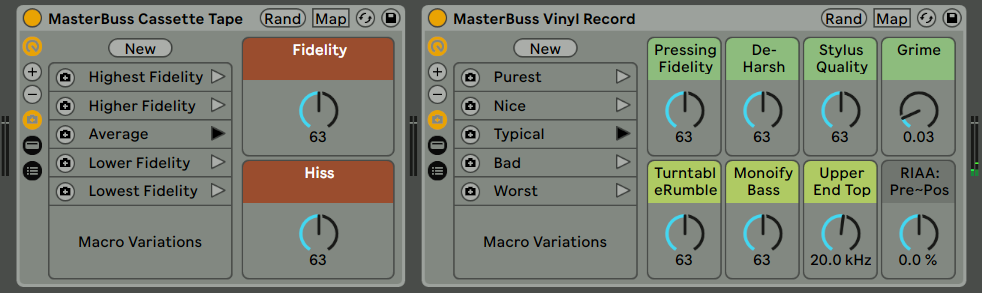
Live 11 versions of MasterBuss Cassette Tape and MasterBuss Vinyl Record from the Bussification pack.

The following PerforModule packs have all been updated for Live 11. If you own any of the sale packs, you can download the updated versions from your account at Isotonik Studios, either now or at any later date when you acquire Live 11.

Everyone is welcome to grab the free packs!

~`~

FREE PACKS UPDATED FOR LIVE 11
Emphasizers
ParallAux
Sweetie Pies
Turboencabulation
Utilification

SALE PACKS UPDATED FOR LIVE 11
Advanced Splytterz
Amplitude Operands
Bussification
Dephaultz
Drum Enhancerz
DynaMixing Ultimate
Empathy
Guitaritis
Harmonicality
Note Range Setters
One Knob Wonders
PMX FX
Testful Mastering
Uno Plus

Continue reading

Ten More Youtube Channels Worth Subscribing To

Aaron Holstein

I met Aaron Holstein (aka VibeSquaD aka Backpact aka the bassist/keyboardist from Zilla) at the 2007 Sonic Bloom festival in Colorado, where my wife Lore and i were supplying coffee and tea backstage for the artists. I remember chatting with them after their awesome set with Sporque (one of my favorite live acts to dance to ever which also had Ooah from the Glitch Mob on beats and Jamie Janover on percussion), wherein i mentioned noticing that a certain bass synth note they kept hitting happened to resonate with the stage, causing this extra delicious rattle. “It was a C sharp!” Aaron told me later backstage. I’ll always remember that.

Continue reading

Parallel-Friendly Native FX Racks for Live 10+: “ParallAux”

Which Effects Work Best In Parallel?

So one day i got it in my head to figure out which of Ableton Live’s Effects are the best to use in parallel.

What is the criteria for this? Simply, which processes alter the phase of audio passing through them, either to the least degree, or in a nicely summable way.

Why does this matter? Because phase offsets, when summed in parallel with the original signal, will inevitably cause changes to the frequency contour. Sometimes slight amounts of this phase offset can add a nice creamy touch to the sound of things (and pretty much all analog gear causes it to some degree), but when being surgically technical like during the finalizing stages of a track, they are generally just not helpful.

An example of not altering phase at all is Live’s Compressor effect which is phase-neutral; it can be used safely in parallel with no unwanted frequency coloration whatsoever.

An example of altering the phase in a “nicely summable” way is Live’s Reverb. Technically, it’s altering the phase a whole bunch, but it’s doing so in a time-smeared fashion which results in far less likelihood of perfectly-lined-up frequency cancellations, and so, when at 100% wet, reverbs can be just fine to use in parallel, and are often preferred this way.

After carefully checking the phase response of all of Ableton Live Ten’s native Audio Effects, i came up with five distinct racks providing combinations of the most parallel-friendly native effects, optimized for specific purposes with maximal versatility of application.

~`~

>Check Out ParallAux via Isotonik Studios<

>Download ParallAux PDF Manual<

Continue reading

PerforModule Recommends: Effects Order

While we all know that there is no such thing as a perfect or ideal FX chain order for all situations because it totally depends on context, i have eventually developed some general preferences for the order of effects in a signal chain. Recently updating all my templates for Live 11 has further honed my thoughts on the situation.

We can of course swap around the sequential ordering of effect devices, either for a specific intended result or as a matter of experimentation just to see if an alternate routing happens to sound better on given audio.

As usual when sharing my ideas, it is recommended that you not simply adopt the structure as presented, but rather that you test it out in practice and modify things over time to suit your particular style, keeping notes and updating your own templates as you go. Maybe you think the way i place transient shapers before compressors is idiotic. That’s totally fine!

I’ll share below my go-to effects order, and (most importantly)… WHY.
While some of the choices are probably pretty unorthodox, none of them are arbitrary; they all have reasons. Are they bad reasons? Good reasons? Who knows. But i like to think they are built on logical rationale.

Keep in mind you’re seldom if ever going to need all these types of effects on any single track, but for times when you are using even two different processor types, some guidance as to their ordering might prove useful. Resist the urge to add more effects to a chain just because you can. The fewer processors required to get a sound how you want, usually the better.

Scroll to the bottom for a handy cheat-sheet!

~`~

Continue reading