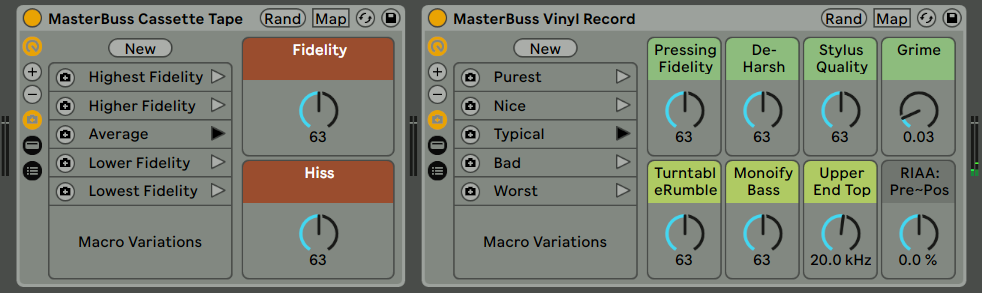
Live 11 Updates for PerforModule Packs.

[Almost] all of the PerforModule sale packs (and some of the freebie packs) have been updated for Ableton Live 11 (finally)!

Primarily, this means that racks which had less than eight mapped macros (resulting in some blank controls) have been tidied up to make use of Live 11’s ability to customize the number of macros shown.

Occasional effect racks have also had some macro variations (aka presets) added to them.

Live 11 versions of MasterBuss Cassette Tape and MasterBuss Vinyl Record from the Bussification pack.

The following PerforModule packs have all been updated for Live 11. If you own any of the sale packs, you can download the updated versions from your account at Isotonik Studios, either now or at any later date when you acquire Live 11.

Everyone is welcome to grab the free packs!

~`~

FREE PACKS UPDATED FOR LIVE 11
Emphasizers
ParallAux
Sweetie Pies
Turboencabulation
Utilification

SALE PACKS UPDATED FOR LIVE 11
Advanced Splytterz
Amplitude Operands
Bussification
Dephaultz
Drum Enhancerz
DynaMixing Ultimate
Empathy
Guitaritis
Harmonicality
Note Range Setters
One Knob Wonders
PMX FX
Testful Mastering
Uno Plus

Continue reading

Parallel-Friendly Native FX Racks for Live 10+: “ParallAux”

Which Effects Work Best In Parallel?

So one day i got it in my head to figure out which of Ableton Live’s Effects are the best to use in parallel.

What is the criteria for this? Simply, which processes alter the phase of audio passing through them, either to the least degree, or in a nicely summable way.

Why does this matter? Because phase offsets, when summed in parallel with the original signal, will inevitably cause changes to the frequency contour. Sometimes slight amounts of this phase offset can add a nice creamy touch to the sound of things (and pretty much all analog gear causes it to some degree), but when being surgically technical like during the finalizing stages of a track, they are generally just not helpful.

An example of not altering phase at all is Live’s Compressor effect which is phase-neutral; it can be used safely in parallel with no unwanted frequency coloration whatsoever.

An example of altering the phase in a “nicely summable” way is Live’s Reverb. Technically, it’s altering the phase a whole bunch, but it’s doing so in a time-smeared fashion which results in far less likelihood of perfectly-lined-up frequency cancellations, and so, when at 100% wet, reverbs can be just fine to use in parallel, and are often preferred this way.

After carefully checking the phase response of all of Ableton Live Ten’s native Audio Effects, i came up with five distinct racks providing combinations of the most parallel-friendly native effects, optimized for specific purposes with maximal versatility of application.

~`~

>Check Out ParallAux via Isotonik Studios<

>Download ParallAux PDF Manual<

Continue reading

Dumb Stupid Tip: Faster Right-Clicking

OK, so you know when you right-click on something to open up a context menu?
And then you move the mouse cursor to the item you want, and then you left-click the option you want?

Well, there is a way to do it a tiny bit faster. Maybe you already do it.

I found myself picking up the habit due to right-clicking to change macro colours so often. By saving a tiny little bit of time multiplied by a whole bunch of iterations, one can end up saving a substantial amount of time. Anything that streamlines workflow is useful, right?

So here’s the tip: Right Click and Release

WTF?

Instead of doing this:
right-click -> move mouse -> left click

Do this:
right-click (hold it down) -> move mouse -> release right-click

Doing this implements the menu option (in Ableton Live at least — not in all programs) with a single mouse click instead of with two mouse clicks, thereby saving you a precious minuscule quantity of milliseconds. For example, if you had to select a hundred boring context menu options, you’d be performing one hundred clicks, instead of two hundred.  Brilliant!

This trick does not work in all programs, but it does in Ableton Live, at least.

So yeah.

NOTE: if following this methodology, make sure that your index finger gets some extra exercise to compensate for its less active role going forward. I recommend angry pointing.

Dry / Wet Anomalies of a few Ableton Live Effects

Often, plugins will cause an effect they don’t tell you about, and you may not realize is occurring.

Knowing exactly what is happening to audio is valuable, because otherwise if we set up chains of effects we may think that we are resulting in a more transparent sound than we really are. Subtle changes to sound can stack up and add to quite audible differences—which if we don’t know the sources of may be difficult to diagnose and address.

Here’s an overview of some of the things some of Ableton Live’s stock effects do to sound passing through them, which you may not realize at first. Some of these quirks many of you will have gotten to know by ear already just by using the effects, in which case seeing the analysis graphs can provide some “aha” moments.

Continue reading

“Go-To” Macro Arrangements for 16-Knob Racks in Live 11

Macro Placement Consistency.

~`~ Consistency in parameters assigned to racks is useful, for always being able to grab a certain knob for a certain result. For example, on the 8-knob racks of Live 10 and earlier, for dynamics devices like compressors or gates, i tend to place Attack and Release on Macros 5 and 6.

16 Knobs! Yay! …but also, Uh Oh!

~`~ Live 11 now has the ability to allow up to sixteen macros on a rack, which expands our abilities — but also makes things easier to become sporadic and messy by just mapping whatever, wherever. More knobs means more searching text with eyeballs. So therefore it seems helpful if certain controls are always (or almost always) in the same places.

Continue reading

New series of Single-Purpose Racks for Ableton Live 11: “Zinglez”

𝒁𝒊𝒏𝒈𝒍𝒆𝒛 is a new series of individual one-dollar racks for Ableton Live 11 by PerforModule.

Simple and straightforward.
Just grab what the ones that entice you the most.
Ignore everything else!

Read about them below.

Continue reading

Organize your User Library Like a Boss ~ Live 11 Style

 One of the most popular PerforModule articles to date is How to Organize User Plugin Presets Like a Boss in Ableton Using the Hidden Architecture and it’s understandable — it’s very helpful to be able to integrate one’s own presets into the browser’s organization structure. And it’s pretty simple to accomplish. Read that article for an in-depth rundown on the topic in which is also explored further customization options for the truly OCD, if you have the desire.
 Or just read on for a briefer summary…

~`~

 •Basically, if you place your User Library presets into folders with the same specific names as the built-in categories, those presets will now also appear in their respective category folders in the browser.

 •Further, you can yourself customize the system, adding your own bespoke categories. Read about that in part two.

 Live 11 Has updated the default categories, adding a handful of new ones which is good news to me, since i’ll be able to integrate more stuff with the built-in system. Some of the choices are a bit odd… but hey, whatever.

Click here to download the blank category folders, and/or copy the following lists for reference.

~`~

Instrument Rack (Sounds) Categories:

Ambient & Evolving
Bass
Booms
Brass

Cinematic
Effects
Exotic
Experimental
Guitar & Plucked
Mallets

MPE Sounds
Orchestral
Pad
Percussive
Piano & Keys
Strings
Synth Keys
Synth Lead
Synth Misc
Synth Rhythmic
Templates
Vintage
Voices
Winds

~`~

Instrument Categories:

For presets of Live instruments that have not been racked.

The same as Sounds categories but with the addition of…

Components

~`~

Audio Effect Categories:

Ambient Spaces
Amp Simulation
Clean Delay
Distortion
Drums
Filter
Formant
Hall
Instrument
Mixing & Mastering
Modulated Delay
Modulation & Rhythmic
Performance & DJ
Room
Space
Special
Vintage Delay
Vocal

~`~

Drum Hit Categories:

Bell
Bongo
Clap
Conga
Cymbal
FX Hit

Hihat
Kick
Misc Percussion
Ride
Rim
Shaker
Snare
Snare Articulation
Tambourine
Timbales
Tom
Wood

~`~

Midi FX Categories:

Drums
Experimental
Monophonic
Polyphonic
Rhythmic

~`~

 That’s it for today. Check here for a nifty list of all my audio production tips & tricks thusfar. More on the way!

New PerforModule Pack: “Empathy”

EMPATHY is a pack for Ableton Live 10+ Suite containing a handful of high-end effect racks designed to consistently improve a wide possible range of audio sources passing through them. Each rack is suited to a particular purpose, with easy-to-dial-in controls. Together they provide a robust toolkit for general mixing and mastering.


Contains:

Ultimatum: “The ultimate” audio effect rack designed by PerforModule, it’s a 10-step algorithm to magically improve both the tone and dynamics of any audio source in realtime.

The One’: One-stop shop for suave, go-to tonal adjustment of tracks in a mix, with low & high cut focus, “light shine” focus, surgical slice, l-r twist, and M vs S intensity.

Auditory Miximizer: The PerforModule twist on the infamous sonic maximizer, with tastefully optimized frequency contours and dynamic reactivity. Comes in 3 versions: stereo, L-R, and M-S.

Dilation Warder: Combination gate and expander for when you want to increase the dynamic range, tighten things up, emphasize punch, and add more of a percussive, staccato feel.

~`~

Skip to the bottom of this post to check out a video overview of Empathy by Brian Funk, or read on for a more detailed overview of each the included devices and what makes them special.

Continue reading

Brian Funk’s Live Pack Archive — Powered Up!

Packification
So i recently helped our mutual friend Brian Funk reorganize his Live Pack Archive, a $10 massive grab bag of Ableton Live goodies assembled from the freebies that he’s been steadily churning out over the years, all the way from the very first pack in 2011 to the contemporary 200th. It’s a lot of stuff! Judging by the plethora of 5-star reviews of the product on gumroad, it seems like people dig it.

Ah, Convenience
Sure, you could go download all this stuff one at a time methodically blog post by post. However it’s much easier to just pay the convenience charge and get all the stuff in one bulk download. This collection has been on offer for a while now, but they were basically presented in a big pile of folders. Fun to scout around for sure, but not exactly optimal when it comes to workflow convenience.

Power Up!

Aha! See, now the collection is even more splendid, as all the devices come consolidated in two mega-packs with similar categories of sounds, effects, and clips sorted logistically for quick perusal and easy implementation directly from the Live browser (including signal previews). Find, grab, and use the stuff you want instantly. It’s very handy and nice. But… the price is still the same? What!? Crazy, i tell you!

Partake
Sound intriguing? Well then why don’t you pull up a chair, situate your ass real comfy, and grab yourself some.

Brian Funk’s Live Pack Archive 1-200.
click that▲
▼or that

[Pack 1 works with Live 9 or later, pack 2 with Live 10 or later.]

Synchronistically, this happens to be my 100th PerforModule blog post. Neato.

Peace, y’all! 😎

Beat Shaker for Beat Juggling

⠀⠀⠀I haven’t performed as a DJ in years, focused on raising my son and home studio work instead, but i was pretty active as one around the Colorado Springs area from about 2010 until 2014. One of the my favorite toys to use to manipulate beats live on my laptop was Alexkid’s Instant Haus, which “instantly generates drum patterns to craft into your own house track” (available free via Ableton). It’s great way to add variation to beats in an organic fashion.

⠀⠀⠀Well, i’ve been inspired lately because we now have available the freshest incarnation of beat juggling voodoo in the form of the 501k Creatives new Beat Shaker device, crafted by the very same Alexkid. It’s a similar concept, but greatly expands on the potential and flexibility.

Continue reading