Free LANDR “Tone Sculptors” Ableton Live pack + other nifty stuff

I recently helped tweak and finalize a set of free audio effect racks in collaboration with online mastering service LANDR.
These are three effect racks suited for quick and easy “tone sculpting” of parts which are centered on low, mid, or high frequency ranges.

Check out the story about it and find download links here: www.ableton.com/en/blog/free-landr-tone-sculptors/
tone sculptors ableton

If you’ve never used LANDR, i highly recommend it as a way to test your mixes. Finish a mix and send it off to LANDR… listen to the master they send back to you, hear problems more clearly, and then go back to your mix and fix. It’s also a great way to get a new track ready for live performance before it has been sent off for professional mastering or officially released.

Also, check out the new ARCHIPEL ELEMENTS live pack, with drum racks featuring juicy recorded samples ranging in the 4 elements – earth, water, air and fire. Great material for sound design and experimental composition.

archipel elements

Enjoy!

Sometimes the simplest things are the most useful… introducing the free “Utilification” Ableton Live Pack

Here’s a {free} ableton live pack of effects that are made for simple yet extremely useful purposes, including fading, stereo panning, m/s encoding and decoding,.

It is highly recommended to grab these and implement them into your Ableton Live library.

toolz

INCLUDES:

Audio FX

“-inf to +0 Fader” — just like it says, this is a simple fader from negative infinity to zero decibels. When you want a quick and easy volume knob that goes all the way to silence and maxes out with no boost (unlike the “utility” device), use this.

“LR to MS Controller” — this will switch a Left-Right Stereo file to transmit its left channel as the sides and its right channel as the center, or you can swap those results so the right is the sides and the left becomes the center.
You can then tilt the center and sides channels, mute them, and alter their levels.

“MS to LR Controller” — this will switch a Mid-Side Stereo file to transmit its sides channel as the left and its center channel as the right, or you can swap those results so the center is the left and the sides becomes the right.
You can then tilt the left and right channels, mute them, and alter their levels.

[an example of using these controllers would be to make an MS recording into LR to be able to apply a stereo effect to it, then to return it back to MS again]

“Instant Muter” — Mutes the audio, plain and simple, the moment the knob is moved above its minimum value. Use this to be able to easily interrupt the audio flow wherever you want within a chain.

“Stereo Panner” — Allows for “stereo panning”. Using clever routing, this allows non-exclusive panning of audio wherein the content from the opposite side is moved over rather than being faded out (while maintaining overall level). This allows for more natural-sounding panning of stereo sources without losing material.
[For example, let’s say you have a stereo track with a guitar panned hard to the left side and a piano panned hard to the right. Normally if you use a pan knob to move right, the guitar sound would be lost. With this, panning right will gradually move the guitar over to the right along with the piano, rather than removing it.]

“Phase Adjust” — Select among 4 phase-flip options with one knob, and implement micro-delay to align waveforms more carefully, either between the source and the mix or between the left and right halves of the source.

“Utilify” — “Swiss army knife” which includes most of the above devices in one rack.  Use this as a more robust replacement for Ableton’s built-in Utility effect.

—>>> Download “Utilification” for Ableton Live 9+ <<<—

Free Ableton Live Pack: Midi Dynamics

Midi Dynamics BrowserPresenting Midi Dynamics, the latest PerforModule free pack.

It includes 4 simple yet useful devices specifically for controlling midi dynamics, and one silly device with various fun-ctions. Click image to grab!

Midi Dynamics

Included Devices:

Midi Compressor
Smooth out too-loud midi instrumentation.
Use this like you would an audio compressor, to attenuate midi notes which exceed a certain velocity. All notes exceeding the threshold will be attenuated. The further past the threshold it is and the higher the amount is set, the more a note will be attenuated. Notes below the threshold velocity will not be affected at all.
Example usage: Playing a synth instrument melody in which notes above a certain velocity become too harsh-sounding due to a filter resonance tied to the velocity. Use the midi compressor to soften only those too-harsh notes. 

Midi Expander
Smooth out too-quiet midi instrumention.
Use this like you would an audio expander, to boost midi notes which are below a certain velocity. All notes under the threshold will be boosted. The further below the threshold it is and the higher the amount is set, the more a note will be boosted. Notes above the threshold velocity will not be affected at all.
Example Usage: Trying out a melody with a different synth instrument, and the quietest notes are now much quieter than they were previously due to the new instrument’s velocity mappings. Changing the mappings or note velocities would take too much time so you just use the midi expander to lift up the quietest notes.  

[Midi Compressor and Expander Special Notes: You can use Live’s “Velocity” device by itself to attenuate or boost overall note velocity; however these devices are useful for more precise and careful dynamics control, by using the threshold to set a cutoff point. Notes nearby other notes do not affect each other’s response the way an audio compressor’s transients do, so imagine them as if they have perfectly fast & noiseless attack and release.]

VelociRaptor
Set the velocity to a specific value.
Use this when you want rigid control of the velocity of an instrument, to be able to use a knob or automation to set the level at any moment to an exact setting. This overrides input velocity and all velocity effects prior to it in the chain.

Velocity RNG
Add in a bit of random fluctuation to an instrument’s velocity.
At small amounts, this will add in a bit of “humanization” and make the playback of instruments less robotic sounding. At higher settings it will vary more sporadically, until at maximum, a note of any input velocity may result in an output of any possible velocity. Tip: record a midi track with little or no dynamic variation into another midi track, routed through this device at a low setting. The new midi track will now have random difference applied to each note.

Rad-omizer
This is a rack with various tools to quickly alter a midi instrument’s input. Macros include:
Mutant DNA: adds in a random chance that played notes will instead “improvise” and play a different note. The higher the control is set, the more chance of a mutant note, and the further away from its original value it might stray.
Force Scale? Key Major … Minor?: optionally implement a scale selector to force all notes to conform to a chosen major or minor key. Niftily see the choices in the macro control’s numerical box.
High Octave+ … Low Octave+: Blend in added octave notes (Make sure the instrument you are using has enough voices enabled to cover the added notes).
Random Velocity: adds in velocity flux just like the “Velocity RNG” device.
Dynamics: the default position for this is in the middle (63.5). Turn this up to drive overall note velocity; turn it down to soften overall note velocity.

CLICK HERE to grab the stuff!

“8-Bit Reverb” free effect rack

Sometimes you want a pristine reverb with the most delicate and precious tail imaginable.
Other times, you want a layer of digital dirt to add a touch of gritty color.

For those other times…
here’s another new free audio effect rack for Ableton Live 9.
It’s called “8-Bit Reverb” and is a lo-fi reverb effect that can be used on individual tracks or in a return channel.
It stays at an output bitrate of 8, for an old-school computer noise sound.
It has robust controls for sculpting the timbre easily to apply to many versatile usages.

GRAB “8-Bit Reverb” for Ableton Live 9 for FREE by clicking here
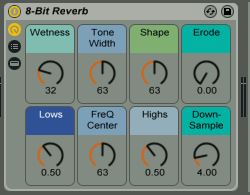
8-Bit Reverb Image

Macro Controls

Wetness:
The amount of reverb.
At 0, effect is bypassed.
To use this as a send effect in a return channel (in order to add amounts of the same reverb to different channels), set it to 100% (127).

Tone Width:
Affects the reverb and erosion bandwidth.
Increase this for a more dense, colored sound.

Shape:
Alters many parameters simultaneously.
Set this carefully for the desired reverberation contour.

Erode:
Adds in erosion coloration to the reverb layer. At 0, no erosion is added.

Lows:
Sculpts the lower range of the reverb. Boost this for more boominess.

Freq Center:
Sets the midpoint of the reverb and erosion tones.
In conjunction with Tone Width this has a great effect on the overall sound.

Highs:
Sculpts the upper range of the reverb. Boost this for more shimmer.

Down-Sample:
Divides the sample rate by the number shown.
(Note that the bit rate is always set to 8; dividing the sample rate further degrades the sound.)

new free Multiband Reverb effect rack for Ableton Live 9

“PerforModule: MultiBand Reverb”

MultiBand Reverb Image

A reverb effect rack sending different calibrated reverb algorithms to the lows, mids, and highs. The lengths, widths, and shapes of each reverb chain are scaled compared to each other leading to very complex, smooth and lush sound which can be used from very short ambience “small box” reverbs to extremely long-tailed hall reverbs, and everything in between. The tone can be altered carefully with just a few macro controls to sculpt the sound with great versatility and ease.

Add in Low, Mid, or High reverberation, change the room size and tightness, and alter the tone with the cutoff and diffusion knobs.

Each chain of the reverb is suited for the frequencies of material sent through it.
The “Low” chain additionally saturates its output. Tip: Try using it on a kick drum or drum buss with a higher “Tightness” setting and turn up “Low Reverb” then play with the room size to add a natural boom to kick drums. 

Click the image above or these words to grab “Multiband Reverb” for free!

Check out an audio demonstration of various settings of the “Multiband Reverb” applied to drum + percussion loops_

~`~

ps check https://performodule.wordpress.com/2013/05/24/how-to-organize-user-plugin-presets-like-a-boss-in-ableton-9-using-the-hidden-architecture/ for how to save this in your Live 9 library so that it shows up in the “Places” section of the browser. Super nifty.

[update] HUGE thanks to ABLETON for featuring PerforModule’s “MultiBand Reverb” for “Free Stuff Friday”!!!

New free GT-8 Impulse Responses by PerforModule at Bedroom Producers Blog

I got inspired one day and sampled a convolution for each effect i could procure out of my Boss GT-8 Guitar Multi-FX pedal. I sent them off to Bedroom Producers Blog, where they are now available for FREE download.
I also made a default “Convolution Reverb Pro” preset Ableton device for each IR and made them into a pack.
I sampled them at 96k 32 bit for no compromise of quality.
If you have Ableton Live 9 + MaxForLive, you can install the effects simply by dragging the .alp file into ableton and clicking “yes”.
If you do not own Ableton Live, do not fear! You can still use these convolutions with your preferred Convolution plugin.
Click the “Boss GT-8 Impulse Responses” image to teleport to Bedroom Producers Blog and grab them!


~`~

Oh and, if you didn’t catch it already, be sure to grab the PerforModule “Pitchbend Vibrato” midi rack over at subaqueousmusic.com! Click the image below to go there.

PitchBend Vibrato Image

Huge thanks to Bedroom Producers Blog and Subaqueous Music both for hosting my crafts and spreading the love. The worldwide creative community is so inspiring!
And a huge thanks to you, reading this. I never imagined this blog would become what it has, and every single visitor here is partially responsible and you have my personal gratitude.

much love
~animus

Free “Chopper” Effect Rack

Here’s a free effect rack.  It allows you to chop up your audio, with a rate knob that fades between 1, 1/2, 1/4, 1/8, 1/16, and 1/32 notes, and avoids triplets. Or, the rhythm can be switched to “Triplets” mode instead. There is built-in extra gating for adjustable dynamics, an “LFO Type” knob to select between 4 different flavors of chopping including random, and an “invert LFO” switch which will make the chop come in where it was going out and vice versa.

Good for live performance, especially on sustained synth tones.

Enjoy~
Chopper Image

<- click image to D/L “Chopper”

~`~

p.s.

Bonus shoutouts to ISOTONIK STUDIOS

Ableton Live & MaxforLive


The brain behind PerforModule has had the pleasure to delve into the “Modular Series” set of devices and wow is there some truly innovative and useful stuff in there! “Follow” adds some much-desired added functionality to clip launching, such as the ability of making a clip launch the next clip when it ends, no matter the length. “Smart” is a great multi-knob to map anything to anything, with the ability to set response curves. So you could for example have one knob that controls parameters in two or more different effects parameters in different tracks in your set, and one of them could ramp up then ramp back down while another just ramps up. Endless possibilities. “Looper” adds extra control to using the loop brace in arrangement view, and there are 3 super-wild glitch effects as well as more nifty gadgets. What’s super cool? If you get one of the Isotonik sets, you get lifetime updates to all the devices.
Check out “Follow” here: https://isotonikstudios.com/product/follow/


Updated set of free special racks to economize cpu: “The Enablerz”

“The Enablerz”

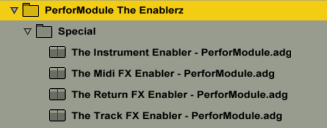
The Enablerz browser image
What they are:  An Ableton Live rack (one each for effects in audio tracks, effects in return tracks, midi effects, and midi instruments)  used to temporarily disable devices without deleting them, thereby freeing up some ever-precious CPU.

Features:  Frees up CPU of contained racks. Click-free realtime operation (feel free to enable/disable while audio is routing through). Input Trim & Output Gains.The Enablerz - Track

Continue reading

Free Device- the Subaqueous Kick Selector

Need kicks? Here we have for you this free Kick Selector courtesy of http://www.subaqueousmusic.com/  ~ the (aqpm) Kick Selector, chock-full of sweet kick samples.
Subaqueous sent me the rack and i tweaked it to be able to harmonically match whatever key your song is in.
It’s always nice having more kick drums to choose from, as the kick drum is a very important component of almost any song.
This rack includes a tasty selection of kick samples, all set to the same pitches and volume levels for easy swappability (is that a word?).

This rack works well playing as just an isolated kick drum when you need one for your song, or you can replace the kick on the drum rack you are working on with this (just drop it over that slot to replace), if you’d like to change it up.

Download it for FREE immediately by CLICKING HERE.

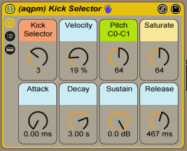
subaqueous kick selector image

Macros_

“Kick Selector” – select your kick from amongst 9 choices
“Velocity” amount kick’s volume is affected by input strength
(set this to zero if you want your kicks always at full volume.. higher if you want input pressure to affect volume)
“Pitch” – sets the root note of the kick sample from C0 to C1. At default of 64 it happens to be a G#/Ab. Set it to an important fundamental pitch of your song’s key for harmonic swagger.  You could even modulate it to switch to a different root note for different song sections.
“Saturate” – sets the amount of saturation and limiting. If the kick sounds weak in the mix to you, turn this up. If it sounds too distorted, turn it down.
“Attack, Decay, Sustain & Release” – your standard ASDR controls. If you’re yet not familiar with what the heck “ADSR” envelopes are, check out http://audio.tutsplus.com/tutorials/production/an-introduction-to-adsr/

~`~