“Planetary Convolution” – a new set of impulse-based reverbs for use with any DAW.

Now unveiling “Planetary Convolution” – a pack of Reverb Impulse Responses, each based on a planet (including dwarf planets!) in our Solar System.
planetaryConvolution

They were created using different custom settings of Ableton’s built-in Reverb Algorithm, re-sculpted into Impulse Responses, and then further enhanced.

Each is presented as a “Convolution Reverb Pro” preset for Ableton Live 9 (+MaxForLive) with individual IRs, tone control parameters and a special 1-knob extra effect each.

Using Ableton Live, the presets will open with their corresponding impulse files automatically.
Non-Ableton users can use the IRs too… just open them with your favorite Convolution plugin (though you won’t have access to to the custom EQ shaping parameters and bonus FX, sorry).


“Planetary Convolution” is available at Isotonik Studios.  <<<<—- Click Here.

(If you’d like to snag some original Convolution Reverbs by PerforModule for FREE… check these out: GT-8 Convolution & Fostex MR8 MKII Convolution.)

Now for an overview of the Impulse Responses that come with “Planetary Convolution”.

Mercury Reverb_
Has a sizzling, bright tone, like you’re getting fried by the sun.
Xtra FX: “Liquid” – adds a creamy movement; molten.

Venus Reverb_
Sandy-sounding with a smooth high end.
Xtra FX: “Scorch” – adds a subtle fuzz which is affected by the tone control. Also has an enhanced “Thick Chorus” control.

Earth Reverb_
Our good ol’ home planet, you know? This has a medium room sound, good for hip hop drums. The overall tone is (you guessed it) earthy.
Xtra FX: “Gravel” – this adds a nice gritty, chalky color to the reverb.

Mars Reverb_
This reverb has a punchy, forthright quality. It is well-suited for march-style drum patterns, brass, or other high-energy instruments.
Xtra FX: “Anger” – dials in some burning bite to the sound.

Jupiter Reverb_
This reverb has a ridiculously long and smooth tail (25.6 seconds to be precise). Use this for extreme spaciousness and super fade-outs.
Xtra FX: “Storm Swirl” – adds movement to the sound as you get carried along the current.

Saturn Reverb_
Very large and with a resonant, ringy quality.
Xtra FX: “Rings Twirl” – take a trip along the concentric circles.

Uranus Reverb_
Has a billowy texture, as if enveloped in thick fog.
Xtra FX: “Vapor” – adds a smoky layer of reverbish decay.

Neptune Reverb_
Has an icy, chilly spaciousness.
Xtra FX: “Frost” – dial in some crystalline crunch.

Pluto Reverb_
Very small, very cold. Just listening to it will drop your body temperature by a few degrees.
Xtra FX: “Interior” – fade into the interior cavity of the sphere. It must be hollow?

Eris Reverb_
A lesser-known dwarf planet, Eris is known as the Goddess of Chaos, having a bizarre orbit.
It has a short, foreboding sound, like the feeling of someone watching over your shoulder.
Xtra FX: “Dirt” – adds a muted, broken darkness.

~`~

By Style_
Booth Type (very small)
-Pluto
-Eris

Room Type (small)
-Mercury
-Venus
-Earth
-Mars

Hall Type (large)
-Uranus
-Neptune
-Saturn

Epic Type (vast)
-Jupiter

`~`

Mars Reverb Image

Ableton Racks Macro Controls_
Dry/Wet: Convolution Reverbs tend to be quite lush, and often are audible at even 1% wet. These start at 23% as a default starting position — make sure to adjust this carefully to not over-apply reverb.
Tone: Starts in the middle by default. Each planetary reverb has its own unique band-interactive filtration which will occur upon moving the “Tone” control up or down. If you have the EQ pane open you will see the visualizer of the audio input spectrum and the EQ curves. After adjusting with the “Tone” dial, you can grab any of the 3 individual EQ nodes and adjust them by hand to fine-tune (they are not locked to the macro). However, once you move the tone knob again, that planet’s custom filter curve will take over again.
Distance: This begins at the default (normal) setting. Turning it down will make the object sound closer; turning it up will make it sound further away. Use this to alter the spatial depth of elements in a mix.
______ (Special Effect): This Macro is named differently for each planet, and has a different sonic effect on each.
Predelay: The time before the reverb first begins. Can be useful for preserving your original transients or adding a stuttered rhythmic feel.
Chorus: Adds a subtle creamy stereo movement. The planet Venus has a more extreme “Thick Chorus”.
Stereo Width: Lower settings place the reverb at the middle of the stereo field; greater settings lead to more spread, up until the maximum possible.
Also: Using controls on the Convolution Pro device (which aren’t mappable to the audio effect rack), one is able to lengthen or shorten the decay, shorten or lengthen the size, combine 2 different planet IRs attack and decay sections, alter the shape of the early reflections and length, cause “cascade” overlapping of decay curve, implement reverb fade-in or fade-out,  adjust the Damping Curve (basically the EQ for the decay), or even flip into a reverse reverb.

Grab PLANETARY CONVOLUTION at Isotonik Studios by clicking >>>>>>>>>>HERE<<<<<<<<<<<

Includes:
-“Planetary Convolution” self-installing Ableton Live Pack. Simply drag the .alp file into Live to install it, and the presets will show up in the “Room” and “Hall” folders under “Places”. BAM. That easy.

-“Planetary Convolution” set of .aif Stereo Impulse Responses (L + R files). These are for anyone who doesn’t have Live.

Provided as a single zip file to download. Once unzipped:
If using Ableton Live: use “Planetary Convolution by PerforModule.alp”
If using another DAW: use “Planetary Impulse Responses” zip file. Unzip it and find the aif IR files inside for usage in your Convolution plugin of choice.

Audio Demo_

~`~

ps. On the topic of celestial bodies, check out the “moon reverb” ableton preset which comes with “PerforModule – Dephaultz”.

new free Multiband Reverb effect rack for Ableton Live 9

“PerforModule: MultiBand Reverb”

MultiBand Reverb Image

A reverb effect rack sending different calibrated reverb algorithms to the lows, mids, and highs. The lengths, widths, and shapes of each reverb chain are scaled compared to each other leading to very complex, smooth and lush sound which can be used from very short ambience “small box” reverbs to extremely long-tailed hall reverbs, and everything in between. The tone can be altered carefully with just a few macro controls to sculpt the sound with great versatility and ease.

Add in Low, Mid, or High reverberation, change the room size and tightness, and alter the tone with the cutoff and diffusion knobs.

Each chain of the reverb is suited for the frequencies of material sent through it.
The “Low” chain additionally saturates its output. Tip: Try using it on a kick drum or drum buss with a higher “Tightness” setting and turn up “Low Reverb” then play with the room size to add a natural boom to kick drums. 

Click the image above or these words to grab “Multiband Reverb” for free!

Check out an audio demonstration of various settings of the “Multiband Reverb” applied to drum + percussion loops_

~`~

ps check https://performodule.wordpress.com/2013/05/24/how-to-organize-user-plugin-presets-like-a-boss-in-ableton-9-using-the-hidden-architecture/ for how to save this in your Live 9 library so that it shows up in the “Places” section of the browser. Super nifty.

[update] HUGE thanks to ABLETON for featuring PerforModule’s “MultiBand Reverb” for “Free Stuff Friday”!!!

New free GT-8 Impulse Responses by PerforModule at Bedroom Producers Blog

I got inspired one day and sampled a convolution for each effect i could procure out of my Boss GT-8 Guitar Multi-FX pedal. I sent them off to Bedroom Producers Blog, where they are now available for FREE download.
I also made a default “Convolution Reverb Pro” preset Ableton device for each IR and made them into a pack.
I sampled them at 96k 32 bit for no compromise of quality.
If you have Ableton Live 9 + MaxForLive, you can install the effects simply by dragging the .alp file into ableton and clicking “yes”.
If you do not own Ableton Live, do not fear! You can still use these convolutions with your preferred Convolution plugin.
Click the “Boss GT-8 Impulse Responses” image to teleport to Bedroom Producers Blog and grab them!


~`~

Oh and, if you didn’t catch it already, be sure to grab the PerforModule “Pitchbend Vibrato” midi rack over at subaqueousmusic.com! Click the image below to go there.

PitchBend Vibrato Image

Huge thanks to Bedroom Producers Blog and Subaqueous Music both for hosting my crafts and spreading the love. The worldwide creative community is so inspiring!
And a huge thanks to you, reading this. I never imagined this blog would become what it has, and every single visitor here is partially responsible and you have my personal gratitude.

much love
~animus

Handy Tip: Custom Metronome Sounds in Ableton

Sick of the default Ableton metronome sound?

Since it is already described more eloquently than i could, i recommend Sonic Bloom’s nifty guide:
http://sonicbloom.net/en/ableton-live-tutorial-how-to-change-the-metronome-sound/

Do that thing.

Here’s what my current metronome sounds like.

and remember: NEVER HESITATE TO MAKE LIFE MORE FUN!

Free “Chopper” Effect Rack

Here’s a free effect rack.  It allows you to chop up your audio, with a rate knob that fades between 1, 1/2, 1/4, 1/8, 1/16, and 1/32 notes, and avoids triplets. Or, the rhythm can be switched to “Triplets” mode instead. There is built-in extra gating for adjustable dynamics, an “LFO Type” knob to select between 4 different flavors of chopping including random, and an “invert LFO” switch which will make the chop come in where it was going out and vice versa.

Good for live performance, especially on sustained synth tones.

Enjoy~
Chopper Image

<- click image to D/L “Chopper”

~`~

p.s.

Bonus shoutouts to ISOTONIK STUDIOS

Ableton Live & MaxforLive


The brain behind PerforModule has had the pleasure to delve into the “Modular Series” set of devices and wow is there some truly innovative and useful stuff in there! “Follow” adds some much-desired added functionality to clip launching, such as the ability of making a clip launch the next clip when it ends, no matter the length. “Smart” is a great multi-knob to map anything to anything, with the ability to set response curves. So you could for example have one knob that controls parameters in two or more different effects parameters in different tracks in your set, and one of them could ramp up then ramp back down while another just ramps up. Endless possibilities. “Looper” adds extra control to using the loop brace in arrangement view, and there are 3 super-wild glitch effects as well as more nifty gadgets. What’s super cool? If you get one of the Isotonik sets, you get lifetime updates to all the devices.
Check out “Follow” here: https://isotonikstudios.com/product/follow/


Handy Ableton Tip – Change a Macro Name After It’s Been Mapped.

Problem:
You may have noticed that after you map a macro knob to another macro, you can then no longer rename it either by clicking on it and pressing [CMD-R (mac) / CTRL-R (windows)] or by right-clicking it and selecting “rename” — the context menu option disappears for that macro =(
Image
Solution?
As long as you have at least one unmapped macro in the rack, click on an unmapped macro. Then press “Tab” until the macro whose name you want to change is highlighted.
You are free to rename it as you like now…sweet!
If the macro it is nested to is currently unnamed, its name will reflect the new change as well.

Image

I went a long time working in Ableton before realizing you can do this, so maybe it slipped under some other radars as well, so i figured i’d pass it along as a quick tip. If you make your own Racks all the time like me being able to rename a macro after it has been mapped if desired is quite useful.

That’s all for today… more heady packs in development.

Peace!

Updated set of free special racks to economize cpu: “The Enablerz”

“The Enablerz”

The Enablerz browser image
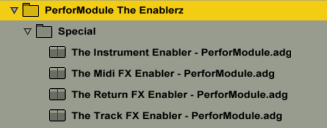
What they are:  An Ableton Live rack (one each for effects in audio tracks, effects in return tracks, midi effects, and midi instruments)  used to temporarily disable devices without deleting them, thereby freeing up some ever-precious CPU.

Features:  Frees up CPU of contained racks. Click-free realtime operation (feel free to enable/disable while audio is routing through). Input Trim & Output Gains.The Enablerz - Track

Continue reading →

Free Device- the Subaqueous Kick Selector

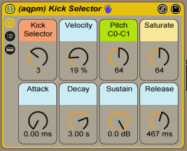
Need kicks? Here we have for you this free Kick Selector courtesy of http://www.subaqueousmusic.com/  ~ the (aqpm) Kick Selector, chock-full of sweet kick samples.
Subaqueous sent me the rack and i tweaked it to be able to harmonically match whatever key your song is in.
It’s always nice having more kick drums to choose from, as the kick drum is a very important component of almost any song.
This rack includes a tasty selection of kick samples, all set to the same pitches and volume levels for easy swappability (is that a word?).

This rack works well playing as just an isolated kick drum when you need one for your song, or you can replace the kick on the drum rack you are working on with this (just drop it over that slot to replace), if you’d like to change it up.

Download it for FREE immediately by CLICKING HERE.

subaqueous kick selector image

Macros_

“Kick Selector” – select your kick from amongst 9 choices
“Velocity” amount kick’s volume is affected by input strength
(set this to zero if you want your kicks always at full volume.. higher if you want input pressure to affect volume)
“Pitch” – sets the root note of the kick sample from C0 to C1. At default of 64 it happens to be a G#/Ab. Set it to an important fundamental pitch of your song’s key for harmonic swagger.  You could even modulate it to switch to a different root note for different song sections.
“Saturate” – sets the amount of saturation and limiting. If the kick sounds weak in the mix to you, turn this up. If it sounds too distorted, turn it down.
“Attack, Decay, Sustain & Release” – your standard ASDR controls. If you’re yet not familiar with what the heck “ADSR” envelopes are, check out http://audio.tutsplus.com/tutorials/production/an-introduction-to-adsr/

~`~

Handy Ableton Tip – Macro Default Positions

You already know that you can hit the “delete” key on any parameter in a device to return it to its default position (or, in Live 10, double-click it).

But did you know that if you save a preset as a rack and then tweak a macro (after re-opening the version you saved), you can hit “delete” to return to whatever YOU set as the default position for it?

When you hit “Delete” on a macro of a plugin (Ableton Core or VST/AU), it returns to that plugin’s default position, which cannot be changed (set per plugin device).

So like if you drop Ableton’s “Chorus” effect on a track and mess with parameters and hit “Delete” on them, they will return to the Chorus Device’s default positions for those parameters. But sometimes you may not like having those pre-chosen values as the defaults to snap back to. The solution is to use Racks!

For saved rack presets in your library, the “Delete” key on one of the 8 macro knobs will return the value of a given macro knob to the position it was set at when it was saved (the “default position”).

[Note this does NOT work with the chain selector or chain volumes. Hitting “Delete” on the chain selector returns it to 0 and hitting “Delete” on any chain volumes returns them to 0db.]

So let’s say i make a preset for a VST EQ Audio Effect and set the “Mids” to +0 Gain as default at the exact half range (63.5). Then if i tweak the mids macro up or down and want to return to 0, instead of typing “63.5” in the macro or try to line it up with the mouse, just hit “Delete”! Way easier.
~`~

1) Saved Preset
Default Macro Positions 1

2) Tweaked Macro

Default Macro Positions 2

.

.

.

3)”Delete” key snaps it back to default!

Default Macro Positions 3

.
.

.

.

(the display rounds to nearest whole #… in this case 63.5 reads as 63)

`~`

New free audio effect rack: “Eroduxion”

Eroduxion imageEroduxion

PerforModule – Eroduxion:
Combines the total capabilities of the Redux and Erosion effects in one device (set in parallel), with the ability to fade between them.

Next time you feel like using some Erosion and/or Redux on a track, try this effect rack instead and save yourself a sec.

Stereo Panning Trick:
~Use the Pan Controls in the rack chains to separate the erosion and redux channels, one to the left and one to the right (the same value). Then use the performodule ‘Low Centerer’ effect rack immediately after ‘Eroduxion’ in order to prevent your low-frequency content such as kick drums from getting panned outwards.

Get yourself Eroduxificated for free by clicking THIS HERE LINK.

Listen to a demo of the Eroduxion rack in action:

`=]~