Need kicks? Here we have for you this free Kick Selector courtesy of http://www.subaqueousmusic.com/ ~ the (aqpm) Kick Selector, chock-full of sweet kick samples.
Subaqueous sent me the rack and i tweaked it to be able to harmonically match whatever key your song is in.
It’s always nice having more kick drums to choose from, as the kick drum is a very important component of almost any song.
This rack includes a tasty selection of kick samples, all set to the same pitches and volume levels for easy swappability (is that a word?).
This rack works well playing as just an isolated kick drum when you need one for your song, or you can replace the kick on the drum rack you are working on with this (just drop it over that slot to replace), if you’d like to change it up.
Download it for FREE immediately by CLICKING HERE.
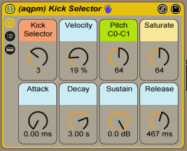
Macros_
“Kick Selector” – select your kick from amongst 9 choices
“Velocity” amount kick’s volume is affected by input strength
(set this to zero if you want your kicks always at full volume.. higher if you want input pressure to affect volume)
“Pitch” – sets the root note of the kick sample from C0 to C1. At default of 64 it happens to be a G#/Ab. Set it to an important fundamental pitch of your song’s key for harmonic swagger. You could even modulate it to switch to a different root note for different song sections.
“Saturate” – sets the amount of saturation and limiting. If the kick sounds weak in the mix to you, turn this up. If it sounds too distorted, turn it down.
“Attack, Decay, Sustain & Release” – your standard ASDR controls. If you’re yet not familiar with what the heck “ADSR” envelopes are, check out http://audio.tutsplus.com/tutorials/production/an-introduction-to-adsr/
~`~


 PerforModule