Actually Using Push 3’s “User Mode”
The free Push 3 User Mode template has been updated for Live Suite 12.4.1+ and is available once more!
(Grab the .alp directly here).
Push Controllers have an underused feature called User Mode. The problem is that you have to manually set mappings. So i did the work, planned out and made a template of mappings for the Push 3 that make the utmost of the controller’s hidden capabilities.
The live set comes pre-loaded with the Push 3’s physical controls mapped to Ableton Live functions for use in User Mode, adding to the total capabilities of the controller. It’s totally dope as a creativity launching pad. I spent hours getting lost in jamming while vetting the update!
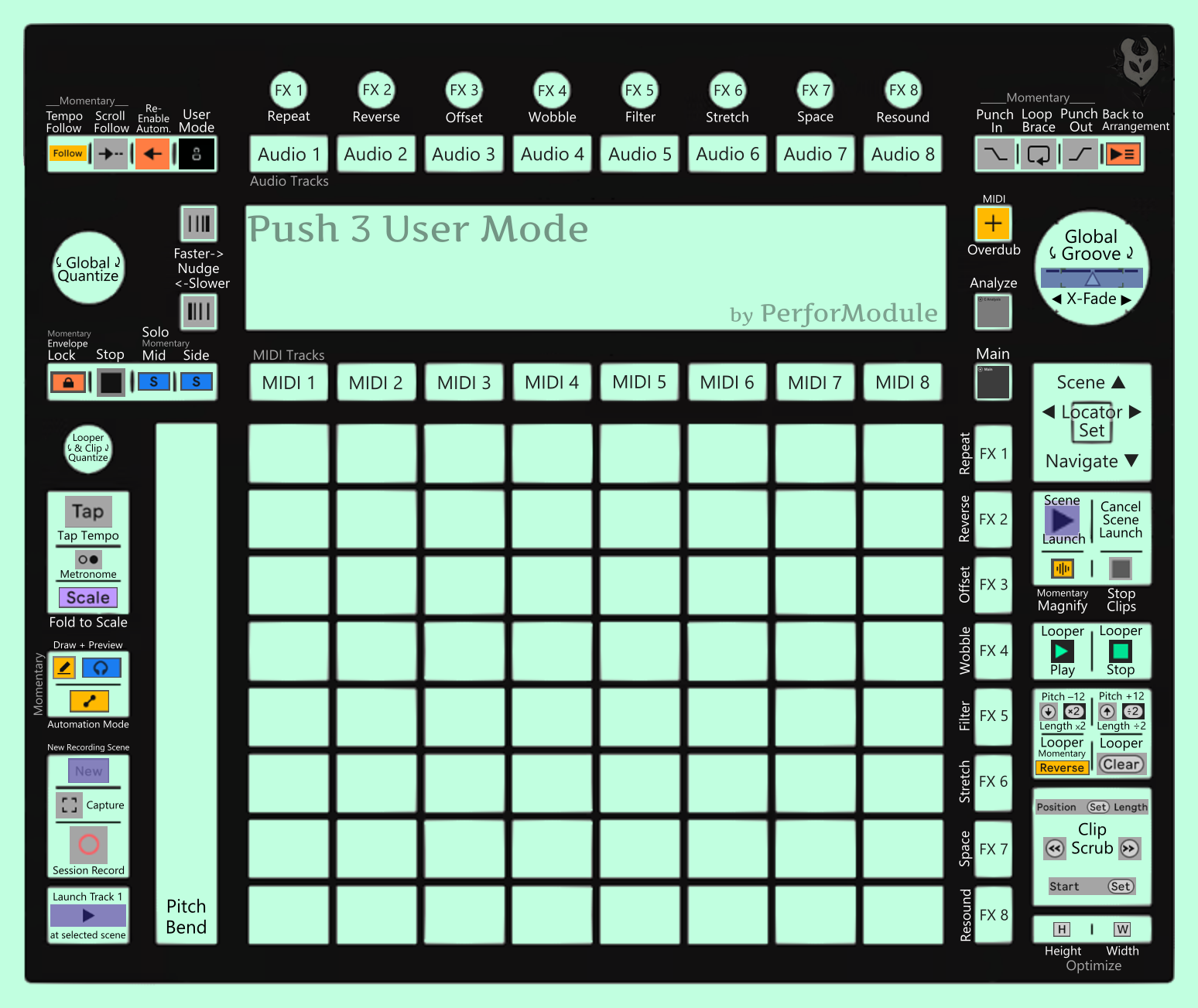
Template Features:
☞ 8 Audio Tracks, selectable with buttons.
Use these for general audio work, mixing, audio in, routing, etc.
☞ 8 Synth Instrument Tracks, selectable with buttons.
Pre-loaded with sandbox starting points for Ableton’s native synths. Just start using them! Tweak, hotswap, etc.
Electric and Operator have been enhanced with Expression Control for added pad expression.
~ Analog.
~ Collision.
~ Drift.
~ Electric.
~ Meld.
~ Operator.
~ Tension.
~ Wavetable.
☞ 6 Sample / Percussion Tracks {ɴᴇᴡ}.
Use these to drop samples in for sound design and to play drums / percussion.
Drum Rack is pre-loaded with a Session Drums kit.
DS Rack is pre-loaded with one of each Drum Synth.
8x Impulse is set up with 8×8=64 drop slots available.
~ Simpler.
~ Sampler.
~ Drum Sampler.
~ Drum Rack.
~ DS Rack.
~ 8x Impulse.
☞ FX Aux Return Track with Return OctoFX.
Whoah, an FX rack with eight distinct effect chains you can trigger and use on anything whenever? Cool!
Pre-loaded with eight parallel effects you feed whatever you want into and use individually or combined.
There are eight buttons, each for one effect, and eight control knobs that alter them all in symbiotic ways.
Push and hold buttons to trigger effects; twist the knobs to alter them.
~ FX 1: Repeat (feat. Beat Repeat).
~ FX 2: Reverse (feat. Convolute).
~ FX 3: Offset (feat. Delay).
~ FX 4: Wobble (feat. Echo & Chorus).
~ FX 5: Filter (feat. Filter Delay).
~ FX 6: Stretch (feat. Hybrid Reverb & Grain Delay).
~ FX 7: Space (feat. Reverb).
~ FX 8: Resound (feat. Resonators).
☞ Looper Aux Return Track.
Built-in organic jam Looper with Push controls and foot pedal multi-button.
Send audio to the looper and manipulate it without ever having to use your mouse. It’s fun.
☞ Analysis Aux Return Track.
Two spectrum analyzers and two glue compressors repurposed as rough VU/peak meters.
You can choose which audio to send through analysis (all is, by default).
☞ Keyboard Mappings Included!
The template set comes pre-mapped with the Key Map Template for Live 12, for even more instant functions.
Both midi and keyboard key mappings work together alongside each other.
Modding As You Go:
Feel free to modify the sets built from the template, deleting tracks you don’t need, duplicating and modifying others, etc!
Conflict & Harmony with Other Controllers:
The midi messages sent by Push’s User Mode are unfortunately hard-coded and non-adjustable. The easiest way to avoid potential conflicts with other controllers is to make sure that none of them use MIDI Channel 1. When you want other controllers to double the same functions as Push User Mode, however, you can simply program them to output the same value.
For example, to map Tap Tempo to an additional controller, you would set the desired control to CC 3 of Midi Channel 1, and then both controllers will have that function.
Changelog:
New Sample & Percussion MIDI Tracks:
_Blank Simpler, Sampler, and Sampler racks ready to drop samples in.
_64-pad Drum Rack combining the Session Drums kits SessionDry & DirectNatural.
_64-pad DS Rack pre-loaded with Drum Synth slots as well as 505, DMX, and LinnDrum kits.
_64-pad Impulse because we can’t forget about Impulse.
The Effect Encoders now also control Warp Mode parameters, depending on mode.
_Stretch affects Transient Envelope & Grain Size, Wobble affects Flux, and Filter affects Formant.
_Main Track button now focuses on the main track, similar to with User Mode Off (instead of Limiter Mode Cycle).
_The Plus Button, while held, now temporarily enables MIDI Arrangement Overdub (instead of Select FX Track).
_The Foot Pedals are now mapped: Pedal 1 to the Looper Multi-Purpose Button &
Pedal 2 to Solo FX Return Channel.
_The Page Left and Page Right buttons can now be used for MIDI step input (as well as for Clip Scrub).
_Runaway feedback possibility in FX Return prevented.
_The MIDI Tracks are grouped and folded by default to reduce clutter.
In other news, i’ll be mastering songs live using the new Finalization template & effects at Brian Funk’s Music Production Club live meeting on Saturday the 19th at 12 noon EST. I hope to see you there!